A companion for Sonarr and Radarr
Every instance. One library.
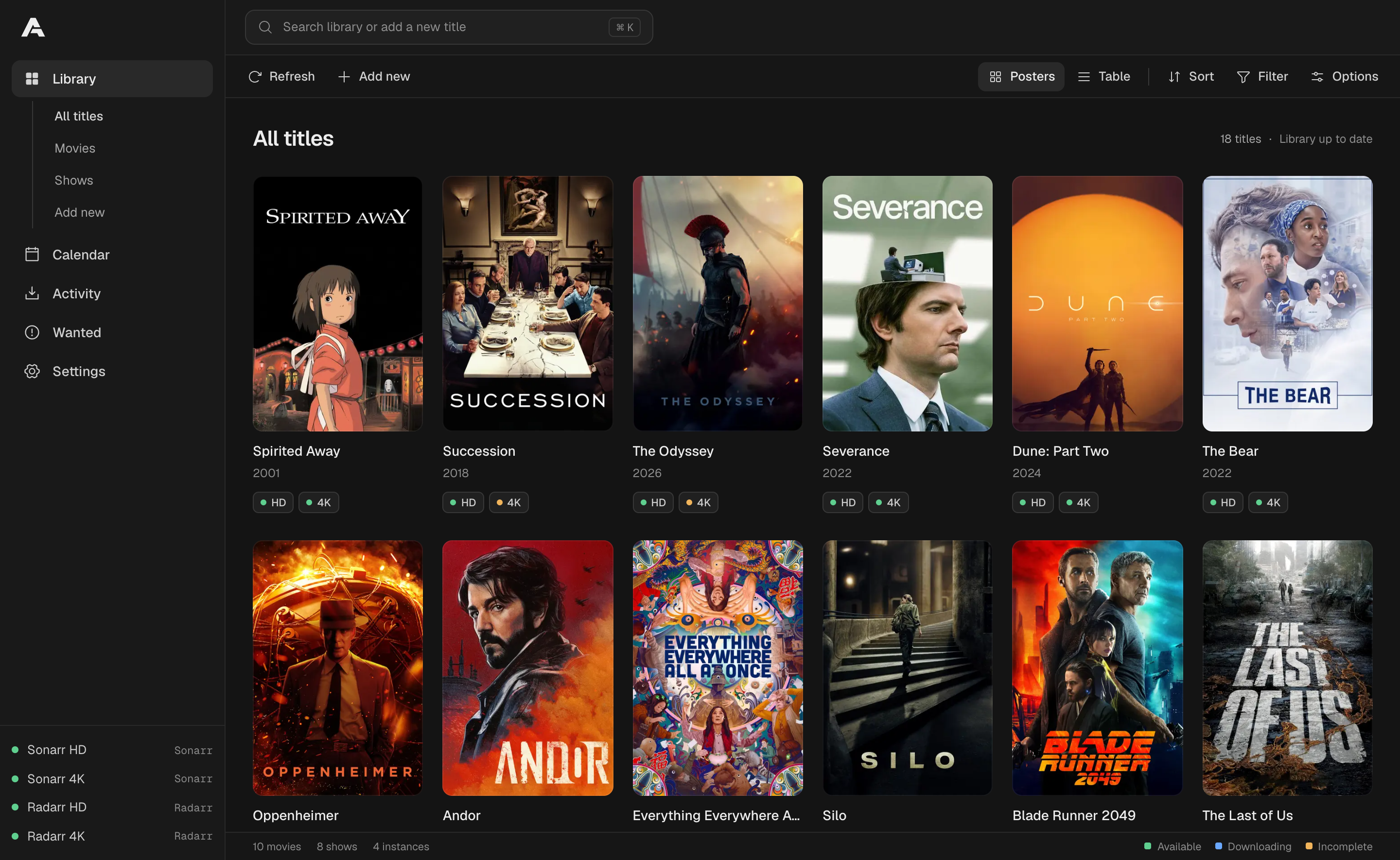
Arrsenal brings your movies, shows, and download queues into one web interface, even when your HD and 4K libraries live on separate Sonarr and Radarr instances.
Open source, Self-hosted, Runs in Docker, No database
The problem
Sonarr and Radarr are great. Juggling several of them isn't.
A separate 4K library is a popular setup, but it doubles every chore. Arrsenal connects to the instances you already run and gives them one front end.
 Arrsenal
- 01
One library, split across four apps
Running separate HD and 4K instances means checking Sonarr HD, Sonarr 4K, Radarr HD, and Radarr 4K one by one just to answer “do I have this?”
Every title, merged, with every instance's status
Matching titles combine into one entry. Each instance keeps its own availability and quality, shown side by side on every poster and row.
HDAvailable4KDownloading - 02
Adding the same title over and over
Want a movie in HD and 4K? Search for it, pick a profile and root folder, then do it all again in the other instance.
Add once, to every instance you choose
Pick the targets, set a quality profile and root folder for each, and add them together. Arrsenal remembers your last choice per instance, and if one target fails, you retry only that one.
- 03
Download queues scattered everywhere
A stalled import in one instance and a failed grab in another stay hidden until you check each Activity tab.
One combined queue, with bulk actions
See progress from every instance in one table. Remove or blocklist items, grab pending releases, and retry imports one at a time or across a selection, with History and Blocklist alongside.
- 04
No single view of what's missing or coming up
Wanted lists and calendars live in each app separately, so the full picture of missing episodes and upcoming releases is never in one place.
One Wanted list and one calendar
Wanted shows every monitored target missing files. Search them individually, by selection, or all at once. The calendar merges episodes and movie releases into one month and agenda.
- 05
Searching releases one app at a time
To look for a better release, you open the right instance, find the title again, and start an interactive search there.
Search from any title, for any target
Start an automatic or manual search for any instance, season, or episode from the title's page. Results arrive in a sortable table with rejection reasons, and grabs ask for confirmation first.
- 06
Screens that go stale
With several dashboards open, it's easy to act on a queue or library that has already changed.
Live updates, and warnings when one breaks
Library and queue changes stream in live from Sonarr and Radarr, with no interval polling. If an instance goes offline, the others stay visible and a persistent warning tells you which one.
Features
Built for people who already know their way around the arrs
A familiar sidebar layout, fast keyboard navigation, and the details you'd otherwise dig through several screens to find.
One search for everything
Press ⌘K to jump to recently added titles and library matches, followed by movies and shows you can add.
Filters that go deep
Build custom filters from type, quality, target, monitoring, genre, size, and more, with nested all/any groups.
Posters or a dense table
Switch views, sort, and pick your columns. Filters and view options are saved on the server, so every browser shares them.
Detail pages that do the work
Bookmarkable movie and show pages with per-instance seasons, episode availability, and targeted searches.
Deletion you can trust
Removing a title keeps its files unless you explicitly choose otherwise. Confirmations name the instance and warn about shared files.
Make it yours
Six themes, including Sonarr- and Radarr-inspired palettes, plus a custom accent color.
Keys stay on the server
API keys never reach the browser. Every upstream request is made server-side.
Optional sign-in
Turn on single-account authentication in Settings, with local password recovery if you forget it.
Works with your setup
A companion, not a replacement
Arrsenal talks to Sonarr and Radarr through their v3 APIs. There's no database and nothing to migrate. Removing a connection only removes Arrsenal's own settings, never your media.
Arrsenal gives you
- One library across every instance
- Adding to several instances at once
- A combined queue, History, and Blocklist
- One Wanted list and one calendar
- Search and file management per target
Sonarr and Radarr keep
- Indexers and download clients
- Quality profiles and root folders
- Media management and renaming
- Your existing data and history
- Their role as the source of truth
Get started
Running in a couple of minutes
All you need is Docker and at least one Sonarr or Radarr instance that the container can reach.
- 1
Save compose.yaml
No repository checkout required. Your connections and preferences persist in the arrsenal-config volume.
compose.yamlservices: arrsenal: image: ghcr.io/davidchalifoux/arrsenal:latest ports: - "3000:3000" volumes: - arrsenal-config:/config extra_hosts: - "host.docker.internal:host-gateway" restart: unless-stopped volumes: arrsenal-config: - 2
Start it
Then open http://localhost:3000 on the Docker host, or http://<server-ip>:3000 from your LAN.
Terminaldocker compose pull docker compose up -d - 3
Connect your instances
Select Connect an instance, then enter each Sonarr or Radarr URL and the API key from its Settings > General > Security. Test the connection, save, and repeat for every instance.
Running Sonarr or Radarr on the Docker host? Use host.docker.internal instead of localhost.

Stop switching tabs.Start managing your library.
Self-hosted, nothing to migrate, and running in minutes.